

Hot Press News
- Wavelength Coffee Roasters Launches Hospitality Division to Bring Sustainable Coffee to Restaurants
- Autosy Expands Its Reach Across India and International Markets
- TN Design & Build Extends Premium Architectural Design And Build Service Across Esher's Most Prestigious Addresses
- SAIMUN 2026 Begins with 650+ Delegates from 14 Countries, Celebrating 14 Years of Youth Diplomacy
- 'Weaves of India' Festival Showcases India's Finest Handloom Heritage at Central Cottage Industries Emporium
- Department of Drinking Water and Sanitation hosted the 9th edition of Sujal Gram Samvad
- South Indian Routes Launches 8-Day South India Spiritual Tour Package Covering Tirupati to Rameswaram
- AJEETS Announces Long-Term Hospitality Recruitment Strategy to Support Gulf's Growing Tourism and Hotel Industry Through 2030
- AMTEX 2026 and Fastener Fair India 2026 Open in Greater Noida, Bringing India's Machine Tool and Fastener Industries Together
- BlueIceGems Expands Custom Moissanite Jewelry Collection Worldwide
- Bureau of Debt Settlement Highlights Effective Alternatives to Bankruptcy and Debt Settlement Atlanta GA Solutions
- MR Homez Announces New Residential Projects in Mohali to Meet Growing Demand for Quality Homes
- ICO Announcement Updates Top Upcoming IEOs Resource for Crypto Exchange Offerings
- Dev Technosys Introduces Enterprise-Grade DeFi Development Services
- Dr. Mohd. Riyaz Honours ICMEI for Its Outstanding Contribution to Promoting Love, Peace and Unity Through Art and Culture
 Mail to a Friend Mail to a Friend |
|
 Rate Rate |
 |
MacSonik Releases Google Workspace Backup Tool to Help Businesses Take Control of Their Own Data
2026-07-26 12:33:49
Technology
363
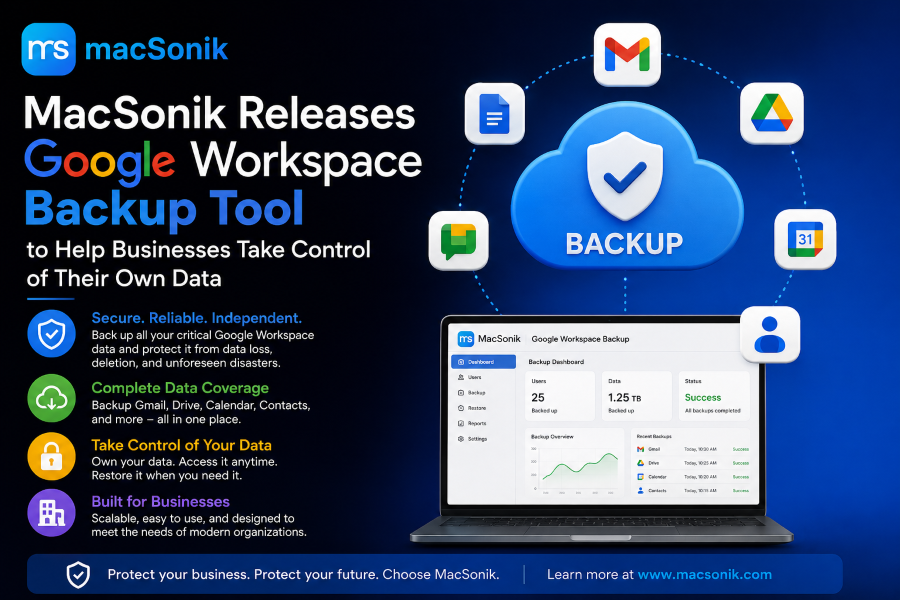
San Jose, CA — MacSonik, a software company known for its email migration and backup utilities, has released its Google Workspace Backup Tool for Windows and Mac. The tool gives businesses a way to pull their own copy of Gmail, Drive, Contacts, Calendar, and Docs data out of Google's environment and store it locally, without relying on Google's built-in trash and retention windows as a safety net.
The release comes at a time when more businesses are realizing that Google Workspace doesn't back itself up. Google secures the platform's uptime and infrastructure, but once a file or email is deleted past the standard 30-day trash window, recovering it isn't guaranteed. For companies without a backup process of their own, that gap has turned into real, costly data loss.
"A lot of business owners assume Google is already backing up their Gmail and Drive somewhere in the background," said Sonika Rawat, Founder of MacSonik. "It isn't. We built this tool for the people who don't have an IT department standing by to solve that problem — just a straightforward way to get their own copy of their data, saved in a format they can actually open and use."
What the Tool Does
The MacSonik Google Workspace Backup Tool connects directly to a user's Workspace account and exports data to the local machine in several common formats, including PST, PDF, MBOX, EML, and CSV. Key features include:
Broad service coverage — backs up Gmail, Google Drive, Contacts, Calendar, and Docs/Sheets/Slides in a single job
No size restrictions on the amount of data exported in one run
Folder hierarchy preserved, so restored data doesn't need to be manually reorganized
Date-range filtering, for backing up a specific window instead of an entire account
Duplicate detection, to avoid saving the same item twice
Cross-platform support for current versions of both Windows and macOS
The tool is aimed at small and mid-sized businesses, IT consultants managing client accounts, and anyone who wants a local, on-demand archive of their Workspace data rather than depending solely on what Google retains by default.
Why It Matters
Google Workspace operates on a shared responsibility model: Google keeps the platform running, but data protection inside the account — recovering from accidental deletion, insider actions, or sync-related overwrites — is left to the customer. Native tools like Google Vault and Google Takeout aren't built to fill that gap; Vault is designed for legal holds and doesn't keep an independent copy, and Takeout is a manual, one-time export that isn't practical as an ongoing backup routine.
MacSonik's tool gives businesses a middle ground: a local, repeatable backup process that doesn't require signing up for a full enterprise SaaS backup subscription, but still gets Workspace data out of Google's environment and onto storage the business controls directly.
Availability
The MacSonik Google Workspace Backup Tool is available now for Windows and macOS, with a free demo version for businesses that want to test the export process before purchasing a license.
Product- https://www.macsonik.com/g-suite-backup/
About MacSonik
MacSonik develops email migration, backup, and file conversion software, with a focus on tools for macOS and Windows users managing Google Workspace, Microsoft 365, and other email and cloud platforms. The company is based in San Jose, California.
Media Contact:
MacSonik
Email: support@macsonik.com
Website: www.macsonik.com
Company :-MacSonik
User :- John Walker
Email :-rohitpatwa7186@gmail.com
Url :- https://www.macsonik.com/g-suite-backup/


To ensure stability and reachability of your applications at all times, remote DDoS protection can keep your hosting services online

Get your Explainer Video at 100 dollars only Today.