
Hot Press News
- New Session of Asian School of Business Inaugurated at Marwah Studios Complex 2
- Niral Networks Participates in Bharat 6G Alliance Symposium at India Mobile Congress 2026
- Essential Wildlife Control Highlights the Importance of Professional Wildlife Control Services in Norwalk, CT
- SKF India (Industrial) Appoints Nilesh Vaidya as Head of Seals, ISEA region
- Tarasafe to Showcase Advanced FR and Arc Flash Workwear at Expo Protection 2026
- Softaken Maildir Converter 3.0 Introduces a Redesigned Interface and Expanded Email Conversion Features
- Raffles Udaipur Presents a Festive Season Defined by The Raffles Experience
- Kerala Ayurvedic Clinic in Dubai Highlights Traditional Ayurvedic Wellness and Postnatal Care
- Prasar Bharati CEO Gaurav Dwivedi Presented with Life Membership of International Film and Television Research Centre
- Shiny Thompson Wins Miss Teen Andhra Pradesh Title and Secures Best Personality title at National Level
- PFRDA Turns to Mutual Fund Distributors to Widen NPS Reach at Bengaluru Outreach
- Dr. Agravat Dental Clinic Implant Wellness Center Integrates 10-Minute Blinkit Delivery for OSMF Mouth Opening Kit Therapies Across Mumbai
- Lalita Kapilavai’s ‘Kalaprayanam’ Art Exhibition Opens at State Art Gallery in Hyderabad
- Rent Lamborghini Dubai Publishes a Transparent Cost Guide for Renting a Lamborghini in Dubai
- Waada Basmati Rice Showcases Its Growing Range of Basmati Rice Varieties
 Mail to a Friend Mail to a Friend |
|
 Rate Rate |
 |
Softaken Maildir Converter 3.0 Introduces a Redesigned Interface and Expanded Email Conversion Features
2026-10-26 08:24:45
Technology
168
New Delhi, India, October 26, 2026 — Softaken has released Version 3.0 of its Maildir Converter, introducing a redesigned interface and an updated workflow for handling Maildir and Maildir++ email data. The release brings mailbox navigation, message previews, and export controls into a more organised workspace.
Moving email data from one format to another is not always as simple as selecting files and clicking Convert. Users may need to check message details, review attachments, or understand how an email is structured before deciding how to save it. Softaken Maildir Converter 3.0 addresses these everyday needs with a redesigned interface and an updated approach to email preview and export.
The new version brings mailbox browsing, message inspection, and conversion controls into one workspace. Instead of treating conversion as a single step, the updated application gives users more room to review their email data before choosing an output format.
A Cleaner Way to Work with Mailbox Data
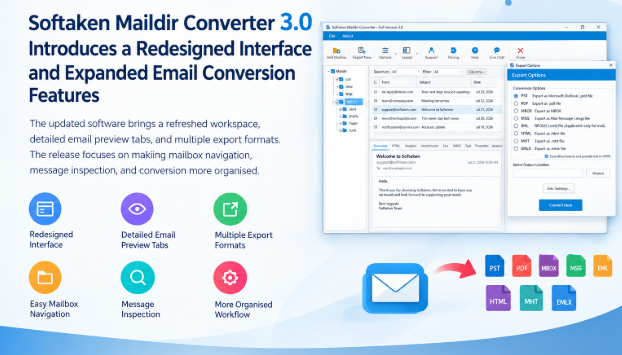
The first noticeable change in Version 3.0 is the interface. Mailbox folders, message lists, and email previews now appear in separate panels, making it easier to move between different parts of a mailbox.
Users can search for messages, apply filters, and adjust the columns shown in the message list. The toolbar also provides access to frequently used functions, including mailbox selection, export, layout settings, and support resources.
These changes help keep common tasks within reach, particularly when working with mailboxes containing many messages.
More Ways to Preview an Email
An email can contain more information than its visible message body. Headers, attachments, formatting, and MIME structure can all be relevant when reviewing mailbox data.
Softaken Maildir Converter 3.0 introduces a multi-tab preview panel that lets users examine these details before exporting. The available tabs include:
* Overview and Text for reading the message content.
* HTML for viewing the available formatted email content.
* Headers for examining message-routing information and other available header fields.
* Attachments for reviewing files associated with the email.
* Hex and MIME for inspecting the message's underlying data and structure.
* Properties and Analysis for viewing additional information presented by the application.
Having these views together means users can move from reading an email to checking its technical details without constantly switching between tools. This can be useful when reviewing unfamiliar mailbox data or checking a message before conversion.
More Choices When Exporting Emails
Different situations call for different output formats. Someone moving email into Outlook may need PST, while another user may prefer individual EML files or an MBOX archive.
Version 3.0 supports eight export formats: PST, PDF, MBOX, MSG, EML, HTML, MHT, and EMLX.
The Export Options window lets users select a format and specify where the converted data should be saved. An Advanced Settings option is also available for additional conversion controls. The exact settings should be checked in the installed version before individual options are described publicly.
Support for Maildir and Maildir++ Files
The software supports Maildir and Maildir++ data, with File Mode and Folder Mode available for selecting source files or folders. It also supports common Maildir directories such as cur, new, and tmp.
Users can review available messages before beginning an export, helping them make decisions about their data before conversion starts. The application runs on Windows and does not require Microsoft Outlook to be installed.
"Email migration is simpler when users can preview their data before deciding where to move it. With Version 3.0, we've brought message previews, technical details, and export choices into a more organised workspace, giving users a clearer way to work through the conversion process."
— Product Manager at Softaken
Availability
Softaken Maildir Converter Version 3.0 is available through the official product website. More information about the software and its supported formats can be found at: https://www.softaken.com/maildir-converter
About Softaken
Softaken develops software for email conversion, data migration, and file management. Its products help individuals and organisations work with different email formats and move data between supported applications. The company offers utilities for handling mailbox files, email archives, and other data formats, with a focus on practical data management and conversion needs. Product information and software downloads are available through the official Softaken website.
Contact Details
For Media Inquiries
Contact Person: Softaken Support Team
Email: support@softaken.com
Website: https://www.softaken.com/
Company :-Softaken
User :- Jordin Fries
Email :-support@softaken.com
Url :- https://www.softaken.com/maildir-converter



Get your Explainer Video at 100 dollars only Today.


To ensure stability and reachability of your applications at all times, remote DDoS protection can keep your hosting services online