
Hot Press News
- Shiny Thompson Wins Miss Teen Andhra Pradesh Title and Secures Best Personality title at National Level
- PFRDA Turns to Mutual Fund Distributors to Widen NPS Reach at Bengaluru Outreach
- Dr. Agravat Dental Clinic Implant Wellness Center Integrates 10-Minute Blinkit Delivery for OSMF Mouth Opening Kit Therapies Across Mumbai
- Lalita Kapilavai’s ‘Kalaprayanam’ Art Exhibition Opens at State Art Gallery in Hyderabad
- Rent Lamborghini Dubai Publishes a Transparent Cost Guide for Renting a Lamborghini in Dubai
- Waada Basmati Rice Showcases Its Growing Range of Basmati Rice Varieties
- Freture Techno Pvt. Ltd. Participates in ADIPEC 2026 in Abu Dhabi
- ODM Tops Education World India School Rankings 2026–27 in Odisha and Jharkhand
- Castrol India Limited maintains 9-month growth momentum in 2026
- New York Immigration Attorneys at Berd & Klauss, PLLC Explain USCIS FY 2027 Fee Increases Effective October 16, 2026
- ReadyBid Makes Enterprise-Level Hotel Sourcing Accessible to Smaller Businesses
- CoinGabbar Explores Crypto Presales to Buy in 2026 Through Token Valuation
- Vajirao & Reddy Institute Announces New Batch for UPSC CSE Preparation For 2027-28 in Agra
- Infinix–CMR Study reveals 85% of Young Casual Gamers Say Gaming Connects Them with Like-Minded People
- DataVare MBOX to PST Converter 2.0 Expands Email Conversion Support for Windows and Mac Users
 Mail to a Friend Mail to a Friend |
|
 Rate Rate |
 |
PDF Champ Adds Whole-Document Signing Option to Its Free Online PDF Signer
2026-10-25 04:23:01
Technology
1024
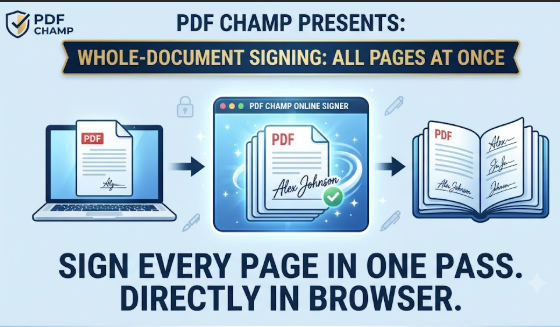
PDF Champ is a browser-based PDF toolkit that includes a free online Sign PDF tool. The tool has added a new option to let users stamp a signature on every page of a document and not just the last page. The update fills a common hole in simple online signing tools that usually only allow you to add a signature at the end of a file.
It is an important distinction for anyone who has had to initial every page of a lease, an NDA, or a multi-page agreement. For short notes and approvals, one signature at the end is sufficient, but for longer contracts and legal documents, it is often necessary to obtain a signature on each page to confirm consent. Now the tool from PDF Champ offers the user a simple choice between the two: sign only the last page or apply the signature image to the entire document in one go.
What’s in the update
• Option to sign only on the last page or to stamp signature on each page
• Signature size can be adjusted to suit different document layouts
• Identical upload-free workflow: PDF and signature image dropped in, placed and downloaded — no server round trip
• No account needed and no file limits tied to a paid plan
The workflow is simple: upload a PDF and a PNG or JPG of a signature, select “last page” or “all pages,” resize to fit, and download the finished file.
Why local processing still counts here
That upload-free approach ties into the theme that’s run through PDF Champ’s browser tools from the beginning — everything is on the user’s own device. The PDF and signature image are not sent to a server for processing. And for anyone signing contracts, financial paperwork, or other sensitive documents, that local-only handling is often just as important as the signing feature itself.
Created for your daily signing needs
• Works right in your browser - Chrome, Firefox, Edge, and Safari
• Requires no installation or plug-in
• PDFs can be downloaded once signed within seconds of upload
• Works for the usual stuff like signing off on forms, getting signed agreements back, or completing internal paperwork
The all-pages option is now included with the free version of the other free browser tools of PDF Champ for merging, splitting, compressing and converting PDFs. They all operate on the same principle - processing is performed on the user's device, no uploading, no need for an account.
“But people think signing every page of a contract online is a matter of dealing with clunky software or paid plans,” said a PDF Champ product representative. “This is designed to remove that friction — select all pages, resize, and you're done, without your document ever leaving your browser.”
About PDF Champ
PDF Champ, a technology company, develops browser-based and desktop utilities for everyday document and file management, with a focus on privacy-first, client-side processing.
Media Contact
PDF Champ Support Team
Product Page: https://www.pdfchamp.com/online/sign-pdf/
Email: support@softaken.com
Website: https://www.pdfchamp.com
Company :-PDF Champ
User :- Shaylee Charlton
Email :-support@softaken.com
Url :- https://www.pdfchamp.com/online/sign-pdf/



To ensure stability and reachability of your applications at all times, remote DDoS protection can keep your hosting services online